Swapping Apache Druid for FerroDruid under Apache Superset
One SQLAlchemy URI change, verified end-to-end in the real Superset UI.
If you run Apache Superset® on top of Apache Druid®, the dashboards are rarely the problem. The problem is everything underneath them: a fleet of JVM processes — Coordinator, Overlord, Broker, Router, Historical, MiddleManager — each with its own heap to size, its own direct-memory buffers to tune, and its own garbage-collection behavior to babysit, plus a ZooKeeper ensemble in the classic deployment. For a lot of teams the Druid cluster was built years ago by someone who has since left, and today it exists to serve a handful of Superset dashboards that nobody is allowed to break.
FerroDruid is a different trade. It is a single Rust binary that speaks the
Druid API surface Superset actually uses — the /druid/v2/sql HTTP endpoint,
the native query JSON endpoints, and the INFORMATION_SCHEMA introspection
that Superset’s dataset sync depends on. No JVM, no ZooKeeper, no six-process
control plane.
This article shows the swap end-to-end under a real Apache Superset 4.1.4 instance : Test Connection, dataset registration with column auto-sync, chart rendering, time-range filtering, and SQL Lab — and then tells you honestly what does not work yet.
(Disclosure: FerroDruid is a commercial product built by abyo software LLC. It is an independent implementation and is not affiliated with or endorsed by the Apache Software Foundation. This article describes a verified test environment, not a customer deployment.)
The stack, before and after
A typical small Superset-on-Druid deployment looks like this:
Superset (pydruid SQLAlchemy dialect)
   └── druid://druid-router:8888/druid/v2/sql/     ← your existing endpoint
         └── Router → Broker → Historical/MiddleManager (+ Coordinator,
             Overlord, ZooKeeper, metadata DB)
After the swap:
Superset (same pydruid SQLAlchemy dialect, unchanged)
   └── druid://ferrodruid:38888/druid/v2/sql/      ← the only line you change
         └── ferrodruid serve --mode single-binary  (one process)
Superset reaches Druid through pydruid in three ways: the DBAPI (SQL Lab
and query execution), the SQLAlchemy dialect (druid://… — the engine ping
behind Test Connection, plus schema introspection for dataset sync), and the
legacy native client (/druid/v2 timeseries/topN/groupBy). All three surfaces
are exercised against FerroDruid in the compatibility suite.
The version pairing verified end-to-end: Apache Superset 4.1.4, pydruid 0.6.9, FerroDruid v1.2.0.
The swap, step by step
1. Run FerroDruid next to Superset
In a docker-compose file, FerroDruid is one service:
services:
  ferrodruid:
    image: <ferrodruid image or AMI-launched host>
    command: ferrodruid serve --mode single-binary --bind 0.0.0.0 --port 38888
    ports:
      - "38888:38888"
(On AWS you can skip the container plumbing entirely and launch the FerroDruid AMI from AWS Marketplace; there is also an EKS container build with a Helm chart.)
2. Change the SQLAlchemy URI
In Superset: Settings → Database Connections → + Database → Apache Druid, and enter:
druid://<ferrodruid-host>:38888/druid/v2/sql/That is the entire migration surface on the Superset side. No connector
plugin, no custom dialect, no ORM workarounds — the stock
pydruid dialect that ships with Superset talks to FerroDruid the same way it
talks to a Druid Broker.
3. Test Connection
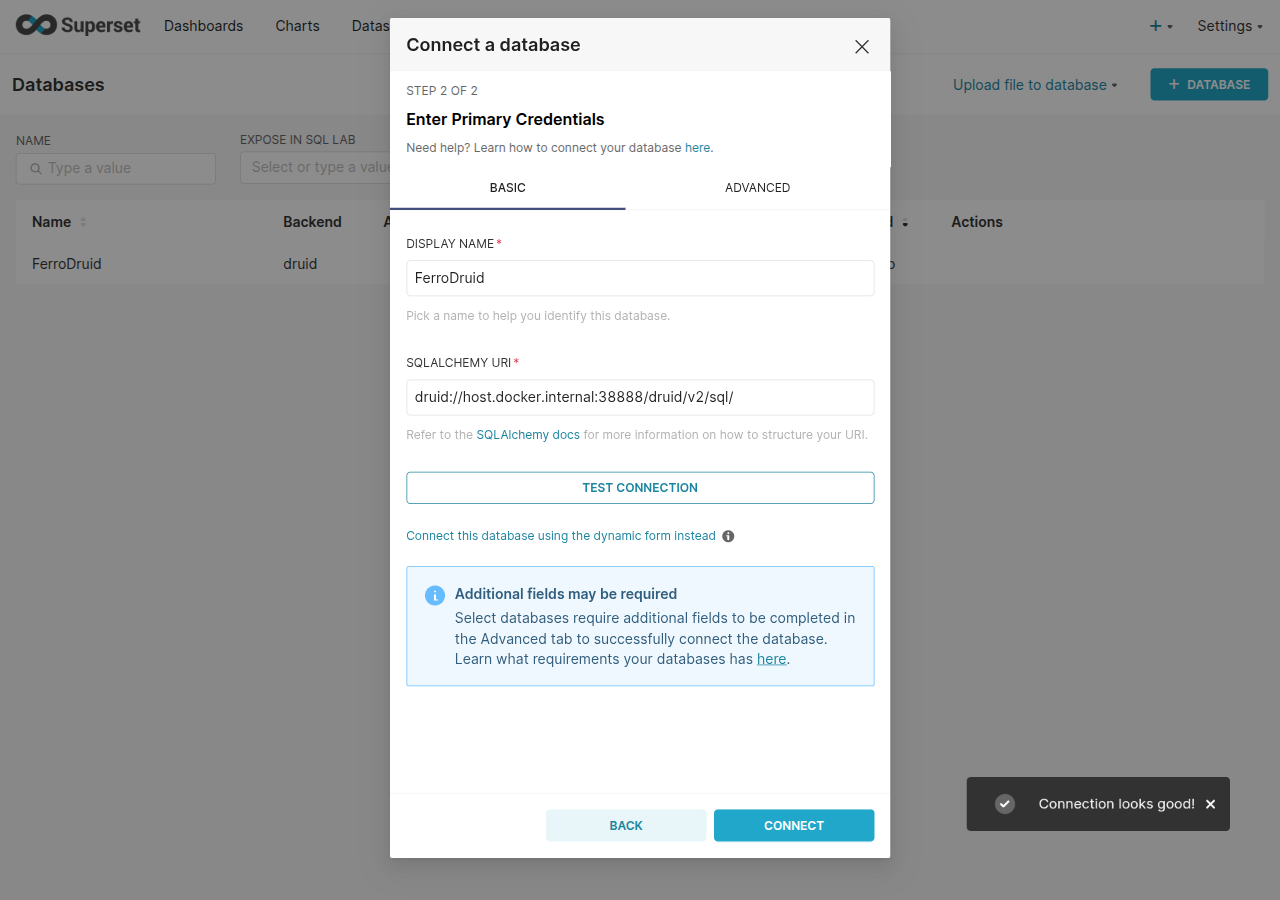
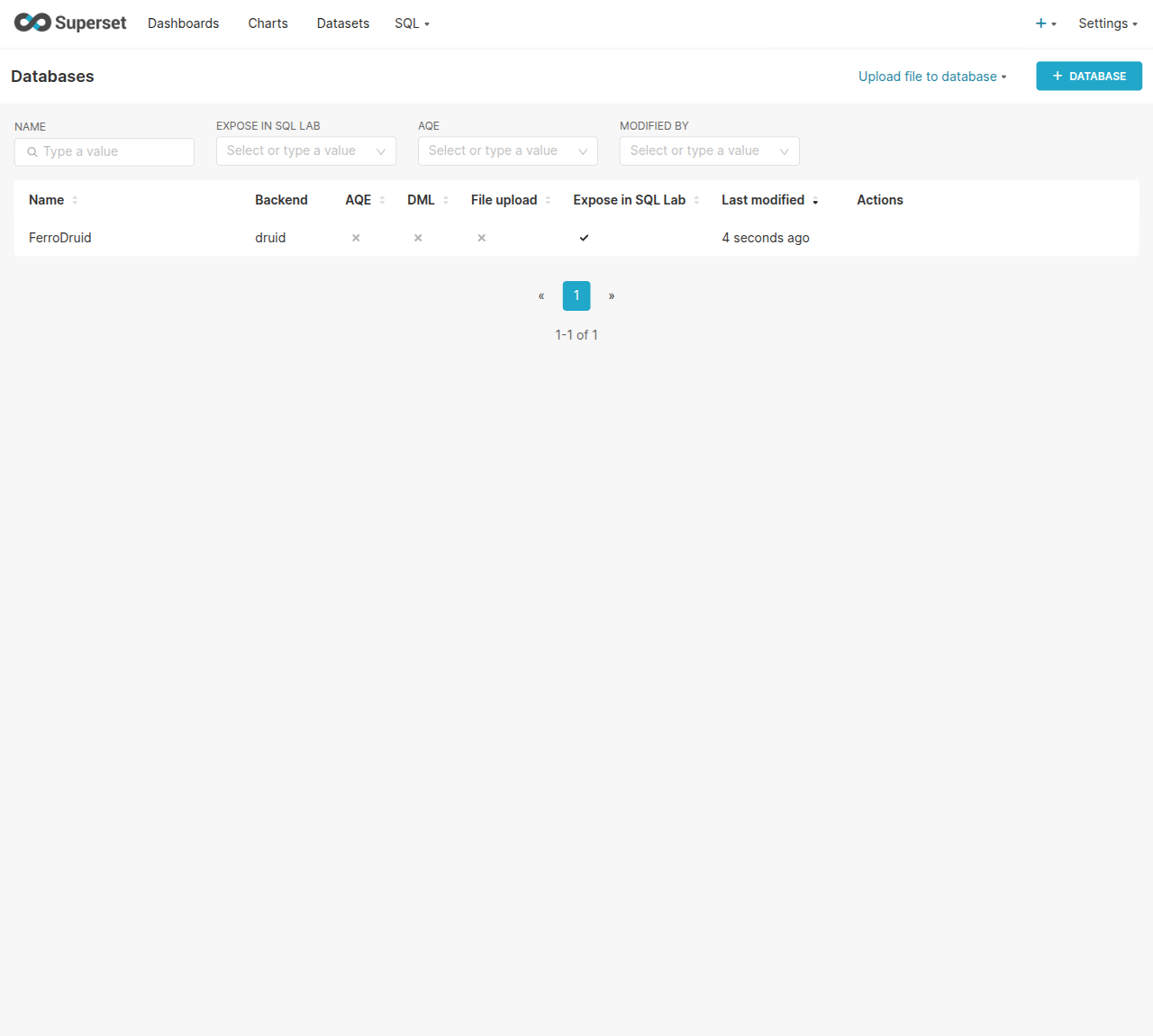
Superset’s Test Connection button issues the dialect’s health-check query
(SELECT 1) through the SQLAlchemy engine. FerroDruid answers it natively —
this specifically required supporting FROM-less constant SELECTs, because
Superset’s do_ping fails against anything that rejects SELECT 1, and an
engine that fails the ping can only be registered by bypassing the UI.
FerroDruid passes the ping in the UI, no bypass.
4. Register a dataset — columns sync automatically
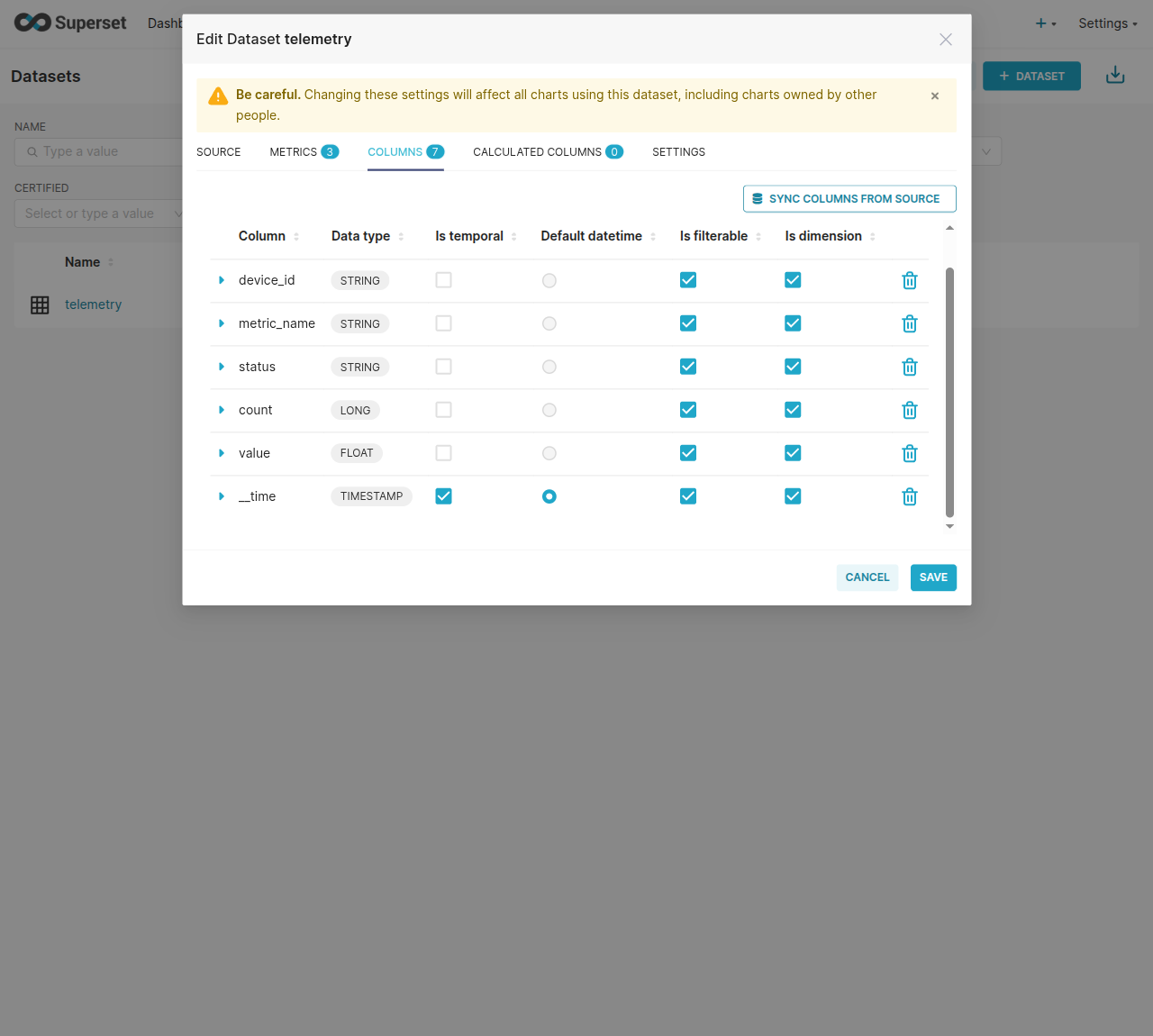
When you add a dataset, Superset calls the dialect’s get_table_names() and
get_columns(), which compile to queries against
INFORMATION_SCHEMA.TABLES / COLUMNS. FerroDruid materializes these virtual
tables on demand from live segment metadata and runs them through the normal
SQL planner, so table auto-discovery and column auto-sync work exactly as they
do against Druid: __time maps to TIMESTAMP, string dimensions to VARCHAR,
numeric metrics to their numeric JDBC types.
Superset’s dataset-existence probe (SELECT COUNT(*) > 0 AS exists_ FROM INFORMATION_SCHEMA.TABLES WHERE …) and its schema-qualified table references
(FROM "druid"."my_table") are both handled — these are the kind of
undocumented BI-tool SQL shapes that break naive “Druid-compatible” endpoints,
and each one was found and fixed by driving the real Superset UI, not by
reading API docs.
One honest setup note: Superset’s pydruid reflection records the synced
__time column type as LONG (with the temporal flag set), so on a fresh
dataset you set __time’s type to TIMESTAMP once in the dataset editor
before building time-series charts. This is a Superset/pydruid reflection
quirk, not a FerroDruid wire divergence — both the SQL results and
INFORMATION_SCHEMA report __time as TIMESTAMP on the wire.
5. Build a chart
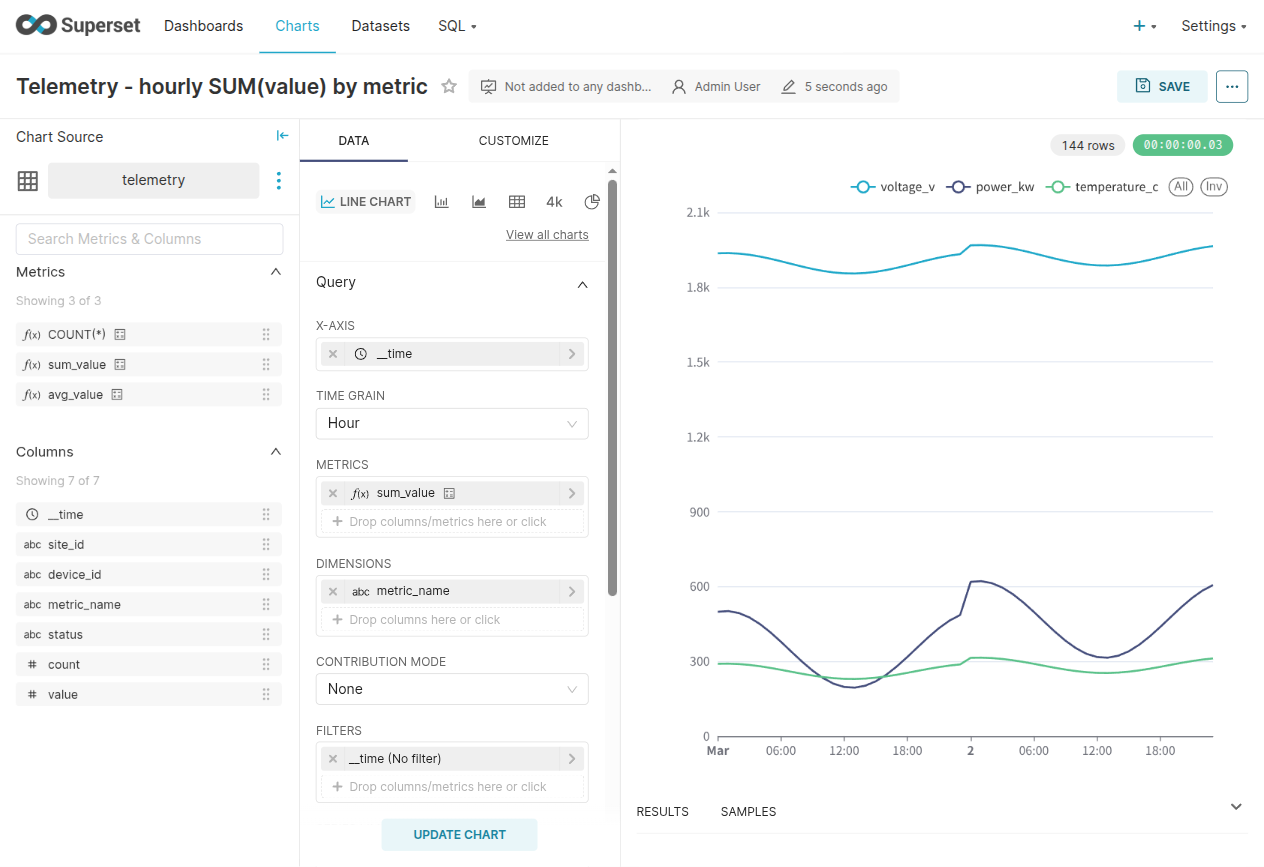
Superset time-series charts issue SELECT TIME_FLOOR(__time, 'PT1H') AS t, <aggregate> … GROUP BY 1 style SQL. FerroDruid returns the bucket timestamp
under its alias with Druid’s ISO-8601 wire shape, and result columns come back
in projection order — which matters because pydruid maps columns to the SELECT
list positionally, and an engine that re-orders JSON keys will silently plot
your timestamp as the metric.
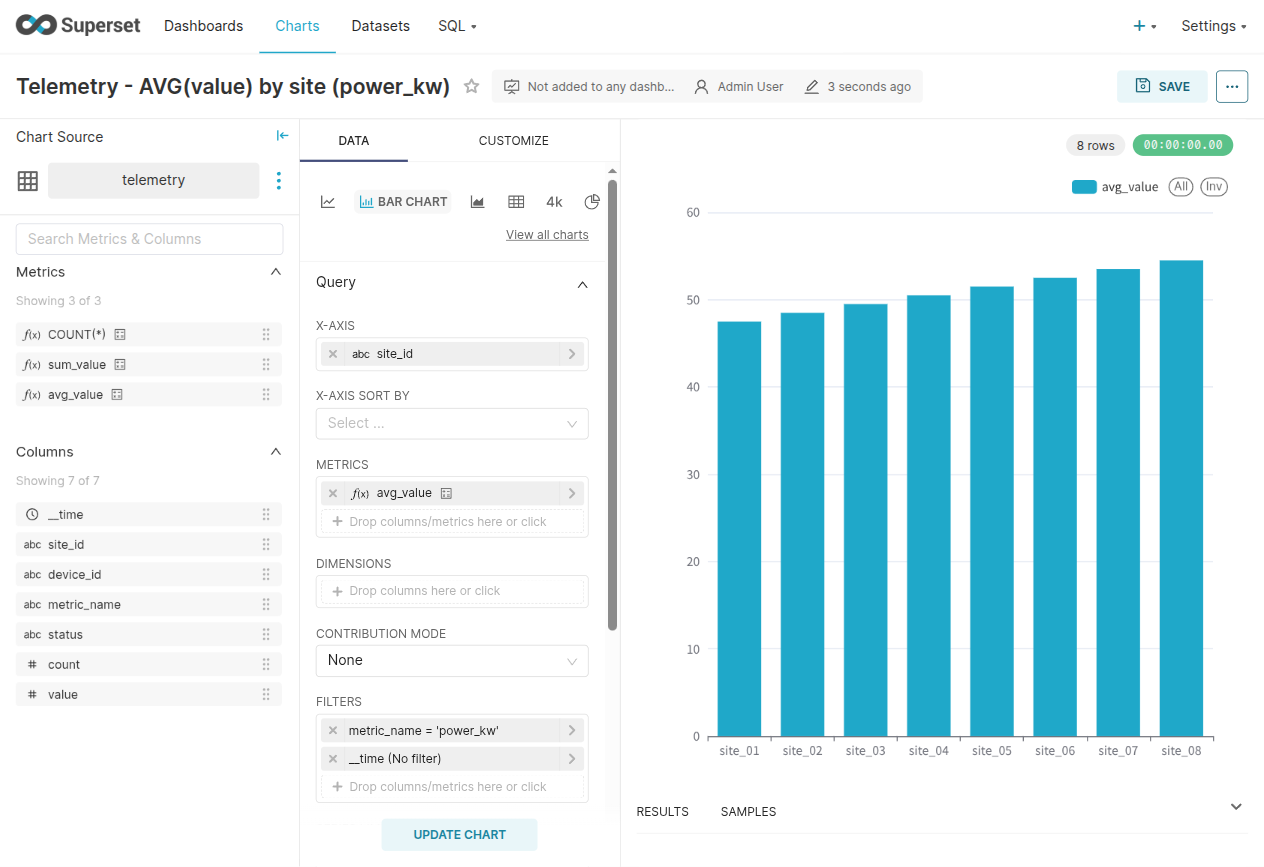
Aggregate metrics built in the Explore UI work too, including AVG, which
lowers to a sum/count post-aggregation the way Druid computes it — and in the
v1.2.0 public release, those post-aggregations merge correctly across multiple
segments, so an AVG over data that spans segment boundaries returns the same
answer Druid returns.
6. Time-range filters — the dashboard feature that has to work
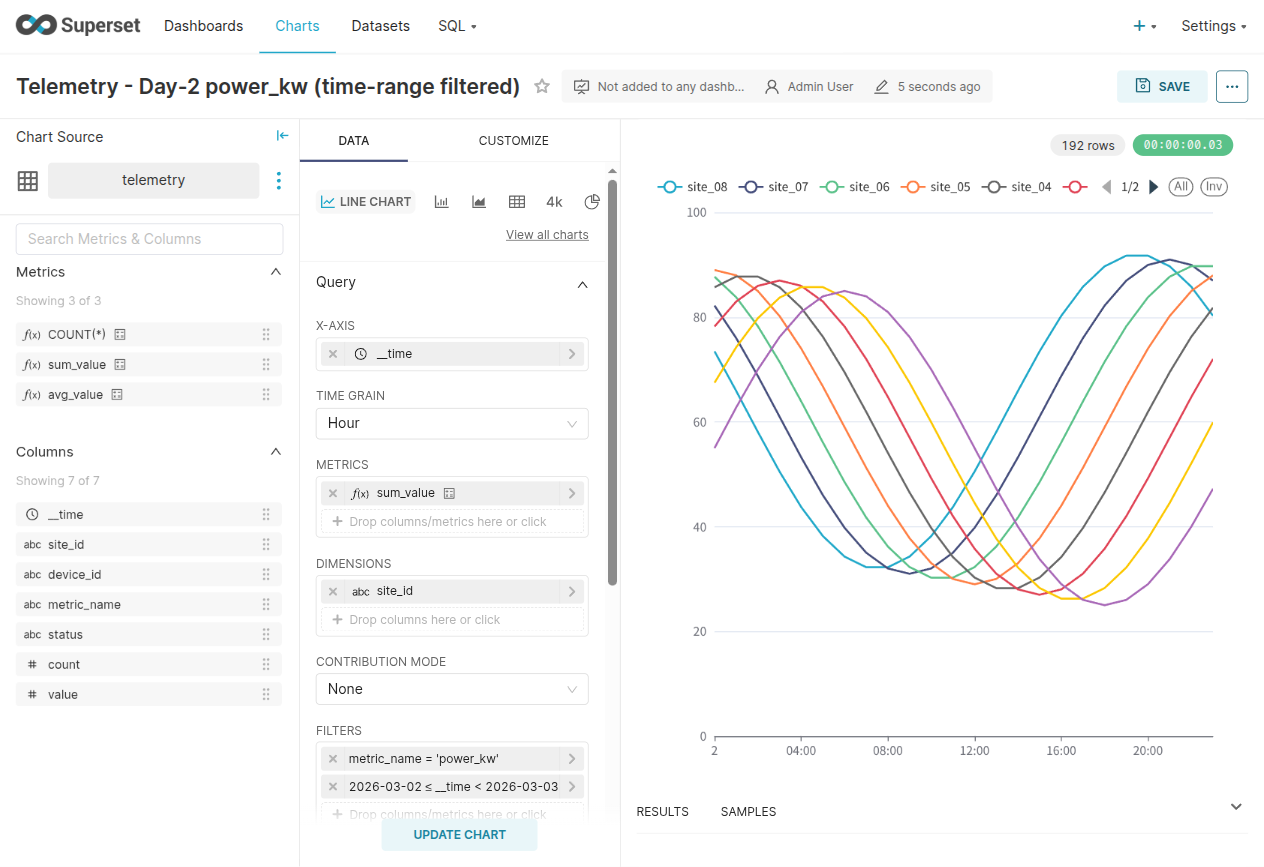
Every real dashboard has a time-range picker, and Superset implements it by
emitting bound predicates with TIMESTAMP literals (__time >= TIMESTAMP '2026-03-02 00:00:00' AND __time < TIMESTAMP '2026-03-03 00:00:00' style
SQL). In the verified run, applying a one-day range filter over the two-day
test dataset returns exactly the expected slice — 192 rows (8 sites × 24
hourly points of the filtered metric) — and the chart’s x-axis collapses to
day 2 only.
Worth being transparent about why this step is in the article: an earlier FerroDruid build returned 0 rows for this exact TIMESTAMP-literal bound shape. The bug was found by driving Superset’s UI, fixed for the v1.2.0 public release, and the screenshot above is from the post-fix build. A wire-compatibility claim that hasn’t been driven through a real BI tool’s time-range picker is a claim that hasn’t met its most common query shape.
7. SQL Lab
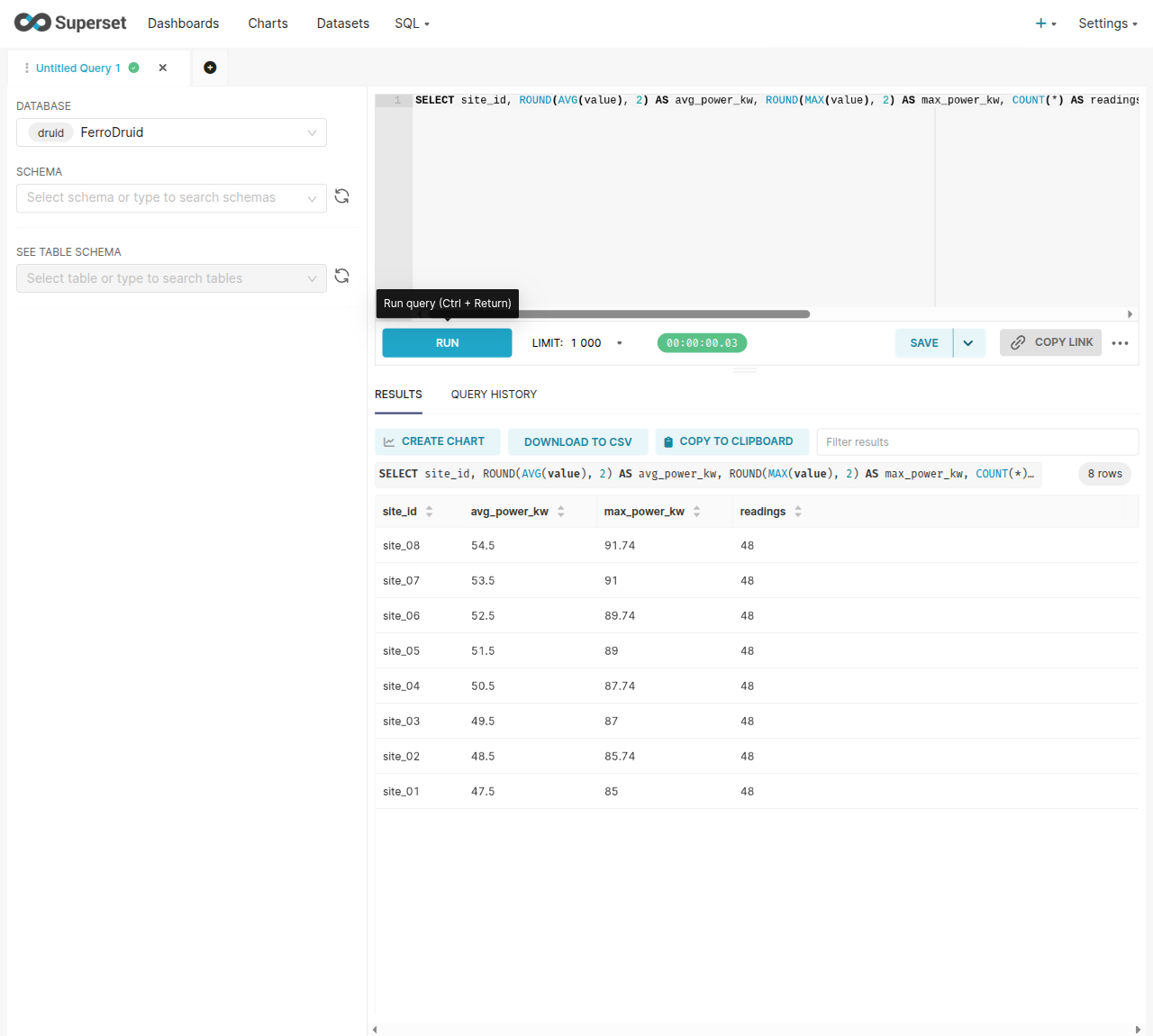
Ad-hoc SQL with WHERE, GROUP BY, and ORDER BY runs in SQL Lab against
FerroDruid, and EXPLAIN PLAN FOR … — the Calcite-flavored syntax Superset’s
SQL Lab emits for Druid — is accepted as well.
What honestly does not work (yet)
An engine swap you would actually bet a dashboard on needs the failure modes stated up front. These are the current, known ones relevant to Superset use. None of them fail silently — that is a design rule (fail-closed with an explicit error rather than return wrong data).
- JOINs and CTEs fail closed.
JOINandWITH …queries parse and plan, but full execution lowering is not wired yet: the SQL endpoint returns an explicit HTTP 501 with a Druid-shaped error envelope instead of executing them. In Superset terms: physical-table datasets and single-table SQL are fine; virtual datasets or SQL Lab queries built on JOINs/CTEs will error (loudly, not wrongly). Recursive CTEs are rejected outright. - Benchmark your own workload before you swap. The measured comparison below is three TPC-H queries on one box; dashboard query mixes vary wildly, and query performance is workload-dependent in both directions.
- No JDBC/Avatica. Superset’s pydruid path is HTTP and works; anything in your toolchain that expects Druid’s JDBC driver (DBeaver, some alerting integrations) will not connect.
sys.segments/sys.serversare not populated. Dataset sync does not need them, but ops tooling that inspects Druid’ssystables will come up empty.- No nested (JSON) columns. Druid 28+ nested column types with path extraction are unsupported; primitive column types and sketch complex types are what you get.
- Multi-value dimension filters have edge cases. Multi-value string columns store and read, but filter semantics may not match Druid in all corners.
- No automatic compaction, so ingestion patterns that produce many small segments need operational attention.
- Scale validation is bounded. The single-binary product has not been validated at multi-terabyte, tens-of-thousands-of-segments, high-QPS production scale. The verified scope is the one described in this article: a real Superset instance driving a single-binary FerroDruid over a test dataset. Treat anything beyond that as your pilot’s job to prove.
On query performance, one measured data point with its conditions attached: on TPC-H Q1 / Q3 / Q6 at SF10 (60 million rows), run on the same physical machine against Apache Druid 35.0.1 with byte-identical query results, FerroDruid measured 12.0× / 16.8× / 5.5× faster respectively. The full methodology (and the queries where the comparison is less favorable) belongs in a dedicated benchmark write-up, and memory footprint is covered in a separate measured comparison we will publish once its measurement evidence lands. Three queries on one box are a data point, not a guarantee — hence the “benchmark your own workload” item above.
Why this is worth the pilot
The operational pitch is structural, not a benchmark: one process instead of six-plus-ZooKeeper means one thing to deploy, one thing to monitor, one thing to restart, and no JVM heap/direct-memory/GC tuning matrix. The compatibility pitch is empirical: the connection path Superset actually uses — ping, introspection, positional column mapping, time-grain SQL, Calcite-isms — was made to work by driving the real UI and fixing what broke, and the evidence trail (screenshots, reproduce scripts, and the full fix list) is public in the FerroDruid compatibility notes.
If you have a Superset instance pointed at a Druid cluster that is bigger to operate than the dashboards it serves:
→ FerroDruid on AWS Marketplace (AMI) · FerroDruid Container for Amazon EKS · Product page
Point a staging Superset at it with one URI, run your real dashboards, and let the fail-closed errors tell you exactly which (if any) of your queries touch the unsupported surface.
Apache Druid®, Apache Superset®, Apache Kafka®, and Apache® are registered trademarks or trademarks of the Apache Software Foundation in the United States and/or other countries. FerroDruid is an independent implementation developed by abyo software LLC and is not affiliated with, endorsed by, or sponsored by the Apache Software Foundation. Amazon Web Services, AWS, AWS Marketplace, Amazon EKS, and Amazon EC2 are trademarks of Amazon.com, Inc. or its affiliates. All other product names are trademarks of their respective owners. No compatibility claim in this article implies certification by any trademark holder.